.webp?width=100&height=43&name=gohappy-logo-full-green-2%20(1).webp)
What the Preview URL Does
The Preview URL:
-
🔗 Generates a shareable demo link
-
🧪 Allows unlimited testing
-
🚫 Does not save results
-
📊 Does not send responses to goHappy
It’s strictly for review and testing — nothing submitted through the preview will be recorded.
🛠 How to Generate the Preview URL
Step 1: Locate Your Survey
1. Go to the Feedback page
2. Find the survey you created (but have not sent)
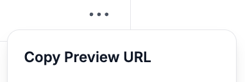
3. Click the three dots (⋯) in the bottom-right corner of the survey tile
4. Select Copy Preview URL
You now have a shareable link ready to send internally.
🧪 How Testing Works
Once someone opens the preview link:
-
They can complete the survey normally
-
No responses are saved
-
No data is recorded
🔄 Need to test again?
Simply refresh the browser page to restart the survey and take it again.
You (and others) can test it as many times as needed.