.webp?width=100&height=43&name=gohappy-logo-full-green-2%20(1).webp)
As your survey library grows over time, older surveys can start to clutter your main screen. Archiving lets you move completed surveys out of the way while preserving all of their data and history, so you can always find them again if you need them. You can still delete surveys as well.
How to Archive a Survey
- Navigate to Feedback
- Find the Finished or Draft survey you want to archive.
- Click the 3 dot options list at the bottom right(...), then select the option to Archive the survey
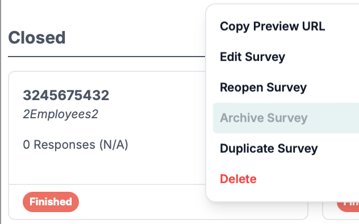
- The survey will be removed from your main Custom Surveys screen and moved to the Archive area
Archiving vs. Deleting — What's the Difference?
| Archive | Delete | |
|---|---|---|
| Removes from main screen | ✅ | ✅ |
| Preserves survey history and results | ✅ | ❌ |
| Can be undone | ✅ | ❌ |
| Survey data is recoverable | ✅ | ❌ |
⚠️ Important: Deleting a survey removes it permanently — all responses, results, and history are gone forever. Archiving is the safer option whenever you want to clean up your account but still retain the survey's data for future reference.
Who Can Archive Surveys?
Admins can archive and unarchive ANY survey. Managers can archive only surveys they have created.
When Can You Archive a Survey?
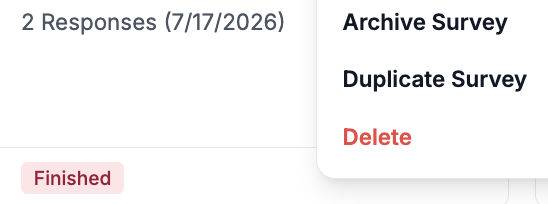
A survey must be in Draft or Finished status before it can be archived. It's status will be marked in the bottom left of the survey tile. Active surveys cannot be archived until they have finished.
How to Find Archived Surveys
- Navigate to Feedback
- Click into the Archive area within the Custom Surveys section(top right of the page).
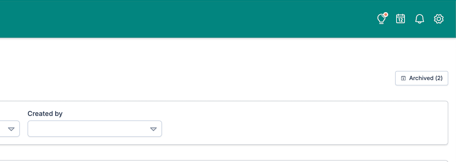
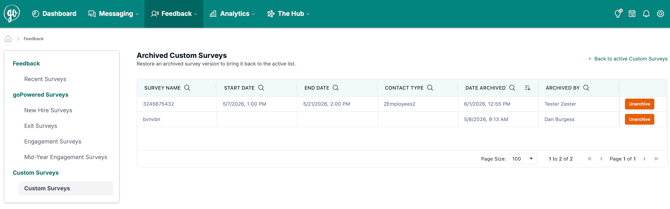
- You'll see a list of all surveys that have been archived
How to Unarchive a Survey
If you need to restore an archived survey back to your main screen:
- Navigate to Feedback → Custom Surveys → Archive
- Find the survey you want to restore
- Click Unarchive
- The survey will be restored with a status of Finished and will reappear in your main Custom Surveys screen
💡 Note: Unarchiving a survey restores it exactly as it was — all responses and history are fully intact.
Frequently Asked Questions
What status does a survey have after it's unarchived? It is restored with the same status it had when it was archived.
Is there a limit to how many surveys I can archive? No. You can archive as many surveys as you need.
What if I accidentally deleted a survey instead of archiving it? Unfortunately, deleted surveys cannot be recovered. Going forward, use Archive instead of Delete whenever you want to remove a survey from your main screen while keeping its data.