.webp?width=100&height=43&name=gohappy-logo-full-green-2%20(1).webp)
Sending a Two-Way Message with Smart Reply
🧠 What is Smart Reply?
Smart Reply allows you to send a question in your message and receive quick, organized responses — all grouped on one screen. This helps streamline decisions like shift coverage, feedback, and approvals.
📎 Want to learn how to see and manage your responses?
👉 Viewing Smart Reply Responses
✍️ Composing Your Message with Smart Reply
Start just like you would with any other message:
-
Select your contacts
-
Click Smart Reply in the message composer
-
Choose your question type:
-
Yes/No
-
Thumbs Up/Down
-
Multiple Choice
-
Text
-
Photo Upload
(More types coming soon!)
-
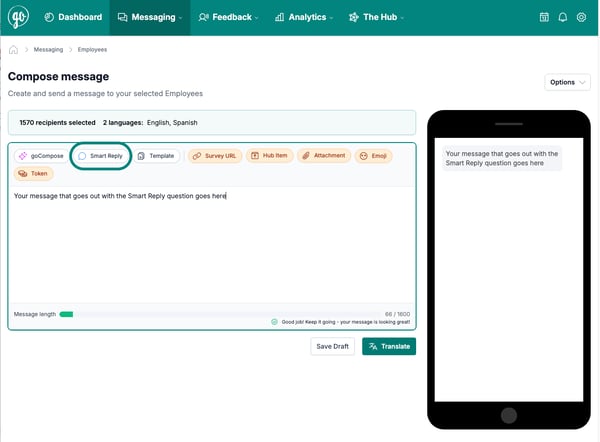
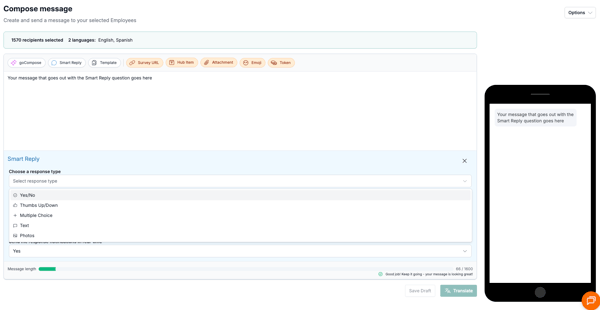
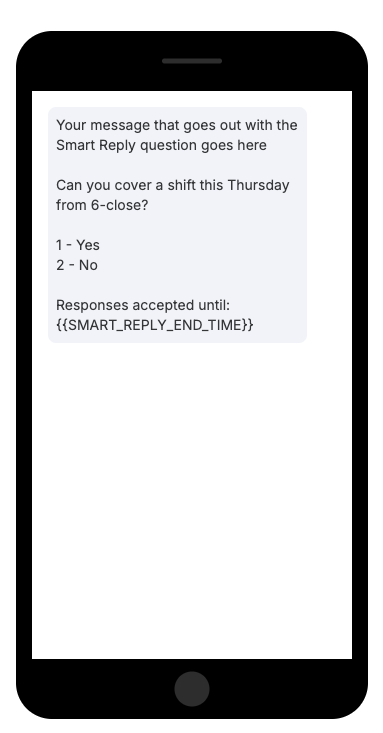
As you write, the preview updates to show the message with your Smart Reply question and response buttons.
🌍 Automatic Translations for Preferred Languages
If employees have a preferred language set, the system will automatically translate:
-
Your message
-
The question
-
All response options
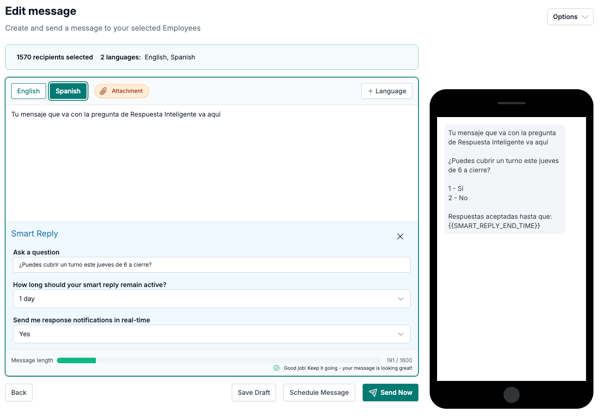
❓ Ask a Question
The "Ask a question" field is where you enter the actual question (e.g., “Can you work Saturday from 10–6?”). This appears above the Smart Reply buttons in the employee’s message.
🕒 Set an Expiration Time
Use the “How long should your Smart Reply remain active?” dropdown to pick:
-
1 day
-
2 days
-
3 days
-
Or a custom expiration via the Other option
💡 Tip: Keep your questions active for a short time to avoid confusion with overlapping messages.
You can include the token in your message — it will be replaced with the actual end time for the employee.

📬 Real-Time Notifications (Optional)
By default, “Send me response notifications in real-time?” is set to Yes — this means:
-
You’ll get an email each time someone responds
-
The email includes their answer and a quick link to view all responses
Set this to No if you’d prefer to check Smart Reply results later in your Outbox.
✅ Why Use Smart Reply?
-
Gather organized responses in minutes
-
Avoid manual tracking or follow-up
-
View results in real-time or in a clean summary
-
Works across languages with no extra steps
-
Ideal for time-sensitive, mobile-friendly communication
📎 Need help checking your responses?
👉 Viewing Smart Reply Responses