.webp?width=100&height=43&name=gohappy-logo-full-green-2%20(1).webp)
Perhaps you launched the survey to yourself and a colleague and after verifying the launch message and the survey link you want to send the survey to your audience. Or you've realized there are other teams, departments, or job titles that should have access to the survey.
There's a quick distinction that needs to be made: public or private survey. If your survey is a public survey, then just send out the survey link to your audience in a text. You can see this by looking at your survey tile on the Feedback page.
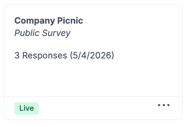
A private survey will show the name of the Contact group that you are targeting with the survey, most likely "Employees", "Team Members", or something indicating employee contacts.
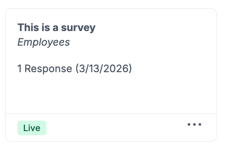
Now to add recipeints to your private survey
1. When looking at the survey tile, click the 3 dot option menu on the bottom right of the tile.
2. Then click "Add Recipients".
3. Choose if everyone will be included in the audience or if you will use criteria to select the new audience. With Criteria you can filter you audience based on the fields we receive from your daily HRIS import. Typically, fields like Store Number, Job Title, or Deparment are used. With Specific Contacts you will check the box next to any name you want in the audience. That could be tediuous, so select the Custom option and you can paste in names, employee Ids, or phone numbers for employees that you want in your survey audience.
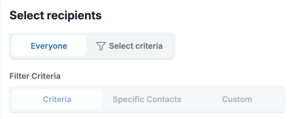
4. Once you audience is finalized, you can review the message that will be sent with the survey link and then click "Send" at the bottom of the page.
Frequently Asked Questions
1. If I send the survey url in a text will that work? Absolutely for a public survey. For a private survey the contact has to be selected as your audience for the survey. Otherwise, if you try that with a private survey then your audience will receive a link that doesn't work for them.